
Out of Memory Error when connecting thru Web Services

If you are using your Connected Business application currently connected via Webservices, and it throws an Out of memory prompt, the problem is usually on where you set up the webservice URL -WEB SERVER
This simply means the Application Pool process assigned to the Webservice application reaches the “Private memory” allotted depending on the Operating System (32-bit or 64-bit environment)
Periodic recycling for assigned Connected Business Webservice application pool
On your WEB SERVER
- Open Internet Information Services (IIS) Manager.
- In the Connections pane, expand the server name, and then click Application Pools.
- In the Application Pools pane, select the application pool you want to edit.
- In the Actions pane, click Recycling...

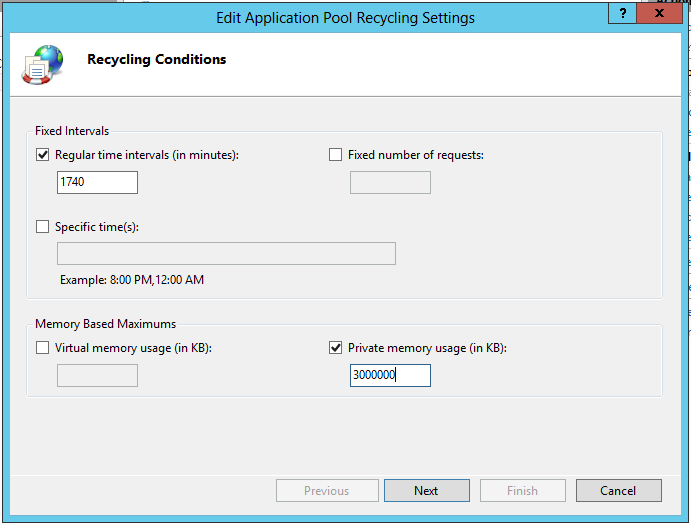
5. On the Recycling Conditions page of the Edit Application Pool Recycling Settings Wizard, Make sure the check box is checked for Memory Based Maximums > Privat memory usage (in KB). Initially type 3000000 as the value. If you are still encountering the OOM, reduce the value gradually up to 2000000
6. (Optional) On the Recycling Events to Log page of the Edit Application Pool Recycling Settings Wizard, select the configurable recycling events and run-time recycling events that you want IIS to send to the event log when they occur, and then click Finish.
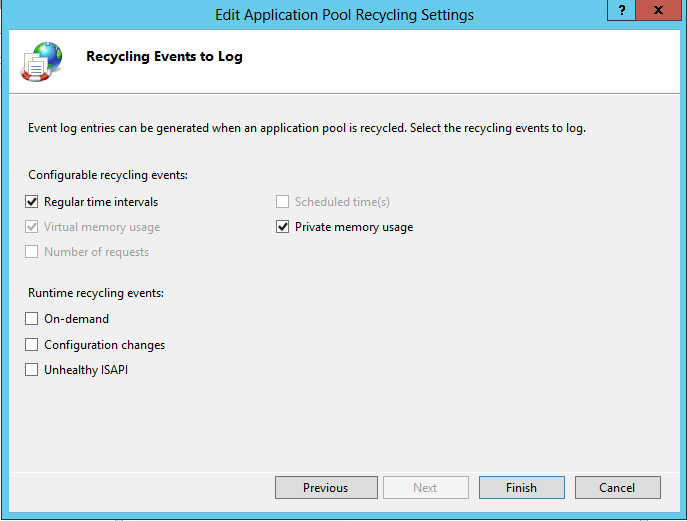
NOTE: IIS is just handling the recycling of the application pool before it reaches the maximum private memory and throws the out-of-memory error
Applicable Versions
CB20 and CB21
